
This page provides access to information and tools for the full assessment of cognitive and behavioral complaints. We recommend the REDCap form linked below to guide the assessment, but a pdf document is also available in the Patient Evaluation Forms page. These full assessment tools can be used to guide the assessment in multiple ways:
- To remind health providers what questions to ask, and providers can document the responses in the medical record
- To provide convenient access to interpretations of potential patient responses (REDCap form only)
- To document the patient's responses in spaces provided, and the provider would devise an approach to transfer the information on the form into the medical record
Practitioners are welcome to copy the questions and create their own forms of that is the most convenient approach for them.
The button below goes to a REDCap-based data collection tool to facilitate and document a full diagnostic assessment.
- This REDCap tool is intended for educational and clinical decision support only and is not intended to collect or store patient records.
- Do not enter patient identifiers or protected health information (PHI), such as names, addresses, birth dates, social security numbers, medical record numbers, or hospital admission or discharge dates.
- It is the user's responsibility to comply with applicable privacy laws and institutional policies.
Launch the REDCap full assessment tool
Full Assessment Workflow
Before the visit
- Send pre-visit patient questionnaire, provided in the Patient Evaluation Forms, if desired
- Can help identify the symptoms that are raising concerns and the severity, making in-person visit more efficient
- Can be administered as a self-report survey, on paper, online, or delivered in person by clinic staff
- Patient and informant complete forms, separately or together (by their choice and convenience)
- Provider and/or care team review responses
- Consider language and education
- Note Toolkit limitations to decide whether full cognitive evaluation needs to be amended, or pursued through specialty evaluation, vs performed in primary care
- If patient is not fluent in English or has a low level of formal education, make sure you are familiar with the content in the cognitive testing information section.
During the visit
- Complete a full assessment
- Perform cognitive testing, using the REDCap form or the PDF form provided in the Patient Evaluation Forms
- Patient and informant attend appointment for accurate history and evaluation
- Go through all questions, even those not endorsed in the pre-visit questionnaire
- Refer to Reference and Interpretation Tables as needed for interpretation of patient/informant responses
- Complete education-level-appropriate standardized cognitive test (MoCA, MMSE, 3MS, SLUMS, etc., as desired), using cutoffs and interpretations provided in the Reference and Interpretation Tables
- See the cognitive testing section of the Instruction Manual for links to background information and tutorials on standardized cognitive testing.
- Complete physical and neurological examination
- Order labs and imaging as indicated
- Test biomarkers for Alzheimer’s disease, when appropriate, according to the decision tree
After the visit
- Interpret findings
- Use the decision tree
- Determine diagnosis
- Consider referral
- Document findings
REDCap Full Assessment Technical Tutorial
Purpose of the REDCap form
The REDCap version of the ACCT-AD assessment form allows convenient access to key components of the evaluation. The REDCap form supports structured collection and documentation of information during an in-person or telehealth diagnostic evaluation of cognitive and behavioral symptoms. It can be used by clinicians, nurses, social workers, care navigators, medical assistants, and other members of the care team. In theory, patients and informants could respond to the questions on their own, but practices would need to develop an approach to obtain a summary of these responses for the provider.
Key features
- Structured clinical history
- Built-in interpretation tables
- Hover-over prompts
- Red flag identification
- Automated summary report
- Export to PDF or copy into the EMR
What is on the form?
The form provides specific wording to elicit responses for each part of the clinical history, including the history of present illness (HPI), a review of the cognitive, behavioral, and motor systems, and spaces to document the neurological examination, laboratory results, and imaging findings. The examiner can use the form as a guide to remind them of what to ask and do, to interpret what they hear and see, or to record all of their findings. If the interviewer/examiner wishes to use the form to record their findings, they can document the presence or absence of each symptom and sign, and enter additional details provided by the patient or informant. After completion, the examiner can submit the form to generate a summary of the findings, which can be copied and pasted into the EMR, printed, saved as a PDF, and potentially emailed.
These same questions are also available in downloadable PDFs on the assessment forms and tools page. The advantages of the REDCap form are that the questions, prompts, and interpretation tables can all be accessed easily from one page, and the interviewer/examiner can input their findings electronically and generate a summary if they wish.
How does the form work?
The REDCap form allows input of clinical information pertaining to cognitive, behavioral, and motor changes. It is designed for clinician input, but also allows input from a patient or an informant. The information provider can indicate their identity.

The form provides opportunities to input relevant information about the evaluation, including the language of administration and the patient's education level. If the patient did not complete college, the toolkit provides links to additional information on cognitive testing for individuals with lower levels of formal education.
If the information provider indicates that they are medical staff, the form will subsequently give additional options for how the toolkit will be used. After the last demographic questions, there will be an option to indicate whether they would like to use the form to record their HPI, as well as probe for additional cognitive, behavioral, and motor changes

If the clinician answers yes, they will be given spaces to record that information (figure below). If they choose no, they can document their HPI elsewhere and use the form only to probe for additional symptoms.

Similarly, near the end of the form, they are given the opportunity to indicate whether they would like to use it to document their exam and laboratory findings (see figure below). Again, if they choose "no," they can document these findings elsewhere.

The core of the form is the individual questions that probe for important changes in cognitive, behavioral, or motor function. An example is provided below for visuospatial function.

For each question, the form also provides prompts, if needed, to guide the clinician, patient, and informant on what kinds of problems are commonly seen as examples of the area being asked about. These prompts are accessed by clicking the arrow in blue section (red arrow, Figure 5) to show the prompts.

If the response to the question is 'yes', the clinician is expected to ask for additional details and examples, so that they can evaluate the changes, as shown in the figure below
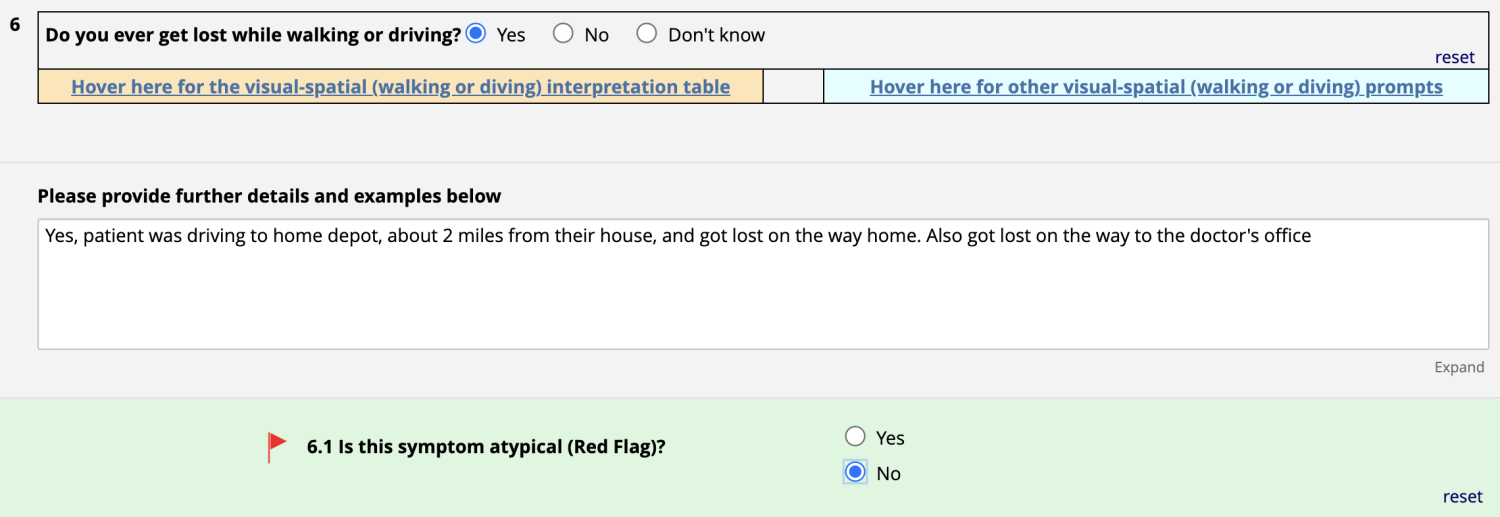
If the clinician is unsure whether this is a typical response for aging, typical for a disorder like Alzheimer's disease, or possibly indicative of a less common form of neurodegenerative disease, they can consult the interpretation table by clicking the arrowhead in the orange section (Figure 7 below, red arrow). If this is an unusual symptom, they can indicate this by checking whether it is a red flag. In the case above, the symptom is concerning but typical for AD and thus is not a red flag for the purposes of ACCT-AD. In this case, the toolkit does not identify any responses that likely indicate an atypical symptom.

Submitting the assessment and generating a report
Once the examiner/interviewer has completed the assessment, they can SUBMIT the responses to the database using the button at the end of the form, which will generate a formatted report highlighting endorsed symptoms, red flags, and key findings. The summary can be copied into the electronic medical record, printed, or saved as a PDF to support documentation and clinical decision-making.